GIS & Mapping Teams
Pull attribute and coordinate tables out of supplied PDFs into Excel or CSV, and turn map exports into the image or PDF format a deliverable calls for.
- PDF to Excel
- Excel to CSV
- PDF to Image
- Image Format Converter
Professional data conversion platform
A professional web-based conversion platform built for GIS, surveying, mapping, engineering, and data-processing teams.
Free 8-day demo account, no card required · 28 conversion tools ·
The running platform — not a concept mockup.
The problem
Professional teams convert, transform, and repackage data constantly before it is usable in the next step. That work is unglamorous, easy to get wrong, and it adds up across a project.
Data arrives in the wrong format
Coordinate lists, attribute tables, and measurements land as PDFs or spreadsheets that the next tool in the chain will not read.
Conversion lives on one desktop
Utilities get installed per machine, so the work waits for whoever has the license and the right version.
No record of what was converted
Files get renamed and re-sent over chat. Nobody can say which version was produced, by whom, or when.
Repetition invites mistakes
The same manual steps repeated across a project are where wrong pages, wrong units, and stale files creep in.
One workspace, every tool
All 28 conversions sit in a single App Center, grouped and searchable, so nobody hunts for a utility.
Runs in the browser
Processing happens on the server. Any team member with an account and permission can do the work from any machine.
Preview before you commit
Built-in viewers show the converted PDF, document, workbook, or image before you download it.
Every job is logged
Each conversion is stored with its file name, status, cost, and timestamp, and stays downloadable from history for 30 minutes after it completes.
Who it is for
ConvaterPro handles the document, tabular, imagery, and packaging work that surrounds geospatial and engineering projects — the parts that eat hours and rarely get tooling.
Pull attribute and coordinate tables out of supplied PDFs into Excel or CSV, and turn map exports into the image or PDF format a deliverable calls for.
Get measurement and control data out of field reports and into spreadsheets, then stamp, secure, and package the plan set you send back.
Assemble drawing sets, drop superseded sheets, add page numbers, and compress a package down to something a client portal will accept.
Give a whole team one conversion platform, decide per person which tools they can run, and see usage across the account.
Professional conversion tooling without a per-seat desktop license.
A REST API with bearer auth and idempotency keys for scripted work.
Controlled access, a full job record, and an option to deploy privately.
How it works
The same flow for all 28 tools, so there is nothing new to learn when a project needs a different conversion.
Open the App Center and choose from the conversions your account is allowed to run. Search by name if you know it.
Add your file and set the options that tool needs — a password, watermark text, target image format, or the pages to keep.
The conversion runs on the server. Status moves from processing to success or failed, and the cost is reserved up front.
Check the result in the built-in viewer, download it, and pick it up again later from your conversion history.
Capabilities
Everything listed here is shipped and running today.
Documents, spreadsheets, PDFs, imagery, and archives all handled from the same workspace, so a project never needs a second tool.
Viewers for PDF, Word, Excel, CSV, PowerPoint, Markdown, JSON, XML, YAML, images, and code, plus page organizing and a background-removal studio.
Four roles and per-user tool permissions mean an account only exposes the conversions that person is meant to run.
A dashboard with 30-day request volume, success and failure share, most-used tools, and recent activity across the account.
Each conversion costs a flat 3 points. If processing fails, the reserved points go straight back to the balance.
Every conversion is also an endpoint. Bearer tokens for auth, and an Idempotency-Key header so a retry never bills or runs twice.
Documents, tabular data, PDFs, imagery, and archives. Pick a category to see exactly what is supported — this is the complete list, not a selection.
Move coordinate lists, attribute tables, and measurement data between the formats your next tool expects.
Turn reports, specifications, and submittals into the format a client, portal, or archive requires.
Assemble, trim, stamp, and secure drawing sets and report packages without a desktop license.
Prepare map exports, site photos, and figures for reports, portals, and print.
Image output formats: PNG · JPG · WEBP · BMP · TIFF · GIF · ICO
Bundle a deliverable into one archive, or open a client hand-off without extra software.
Preview built in for 11 file types: PDF, DOCX, XLSX, CSV, PPTX, Markdown, JSON, XML, YAML, Images, Text & code.
See the product
Three of the screens your team will use every day — the tool catalogue, a conversion in progress, and the usage view that shows what the account has been doing.
Every conversion your account is allowed to run, grouped and searchable.
PDF→Excel
PDF→Word
Merge PDF
Split PDF
Compress PDF
Watermark
Protect PDF
Page Numbers
Organize Pages
Rotate PDF
Image Convert
PDF→Image
Image→PDF
Remove BG
CSV→Excel
Excel→CSV
Zip Files
Unzip Archive
HTML→PDF
Click to select a file, or drag & drop it here
control-points-block-c.pdf · 2.4 MB
Conversion options
Status
Success
Points
3
Balance
1,847
ID
2149
control-points-block-c.pdf
2 min ago · 3 points
boundary-survey-r4.xlsx
18 min ago · 3 points
site-plan-set-issue-b.pdf
26 min ago · 3 points
levels-export.csv
1 hr ago · 3 points
Monthly Requests
1,284
Remaining Points
1,847
Success Rate
97.4%
Active APIs
19
Total Requests 1,284
These are the screens you get on day one. Create a free account to work through them yourself.
For organizations
ConvaterPro is not only a public utility. It is built to run as a team platform, with accounts you administer, permissions you set per person, and the option to deploy it on your own infrastructure.
Already know what you need? See the current plans.
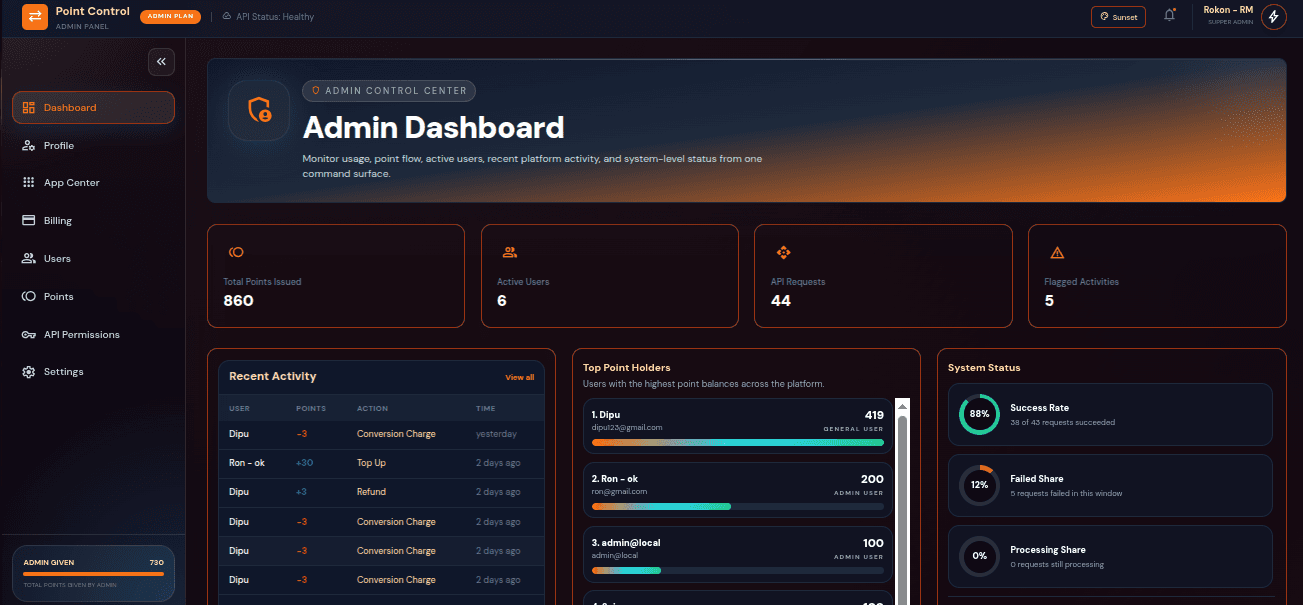
Create users, assign roles, and grant or revoke individual conversions per person from an admin control centre.
Usage history, point ledgers, top-up records, and per-tool activity for everyone working under the account.
Run ConvaterPro on your own infrastructure when data needs to stay inside your network.
Talk to us about onboarding, the conversions your workflow depends on, and what a commercial arrangement looks like.
Why ConvaterPro
Compared with the usual mix of desktop utilities, one-off web converters, and manual steps.
Scroll the table sideways to compare.
| Typical setup | ConvaterPro | |
|---|---|---|
| Where it runs | Installed per machine, tied to one desktop | In the browser, from any machine on the team |
| Tool coverage | A different single-purpose utility for each job | 28 conversions in one workspace |
| Access control | Whoever has the file has the tool | Roles plus per-user permission on each conversion |
| Record keeping | Renamed files in a chat thread | Every job logged with status, cost, and timestamp |
| Checking the result | Download first, open it somewhere else, hope | Preview in the browser before you download |
| Cost of a failure | Time spent, credits gone | Reserved points refunded automatically |
| Automation | Manual, one file at a time | REST API with idempotent requests |
Questions
Including the ones we get asked before a purchase. .
28 conversions across documents, spreadsheets, PDFs, images, and archives — including PDF to Excel, CSV to Excel, PDF to Word, image format conversion, and a full PDF toolkit for merging, splitting, stamping, and securing files. The complete list is on this page.
Not today. ConvaterPro handles the document, tabular, image, and archive conversions that surround geospatial work — the survey report, the coordinate table, the plan set, the map export, the deliverable package. If your workflow needs a specific format we do not list yet, tell us: format coverage is part of what we discuss on a commercial engagement.
Yes. Registration gives you a free 8-day demo account with starter points and your pick of three conversion tools, so you can put real files through the platform before committing. No card is required, and a handful of tools run publicly on this site with no account at all.
There are four roles — demo, general, admin, and super user — and on top of that, permission for each individual conversion can be granted or revoked per user. Someone only sees and runs the tools you have opened for them.
You are not charged. Points are reserved when the job starts, and if processing fails they are refunded to the balance automatically. The failure stays visible in history with its error message.
Send an Idempotency-Key header with the request. Retrying with the same key returns the original result instead of running the conversion — or billing for it — a second time.
That is available as a commercial arrangement. Get in touch with your requirements and we will walk through what a private deployment involves.
A converted file is stored privately against your account and stays downloadable from history for 30 minutes after conversion, then it is automatically deleted from our servers. The record — file name, status, cost, and timestamp — stays in your history; only the file itself is removed.
Start using ConvaterPro today, or talk to us about deploying it for your organization.
Prefer to read first? Browse the API documentation.